Skip to content

✨ Full Access Now Available as Annual or Lifetime Membership → Dismiss

Unlock 10% off your First Theme purchase… SIGN UP!

Browse Themes ⟶
Hello You Designs
  • Themes
  • ShopExpand
    • WordPress Themes
    • Full Collection Access
    • Blog Extras
    • Block Collections
    • Funnel Collections
    • Template Add-Ons
    • Fonts
    • Work With Us
  • HYD Hosting
  • Work With Us
  • Showcase
  • Contact
  • full access!
Shopping Cart 0
  • LOGIN
  • Support
Hello You Designs

how to upload and size your logo

This is one of the topics that is asked often when setting up a new theme. Every theme seems to have a different sized logo area and simply loading in your logo file isn’t going to work. It takes a little bit of prepping before loading your logo to a new theme. If not sized right, it won’t look it’s best.  In this quick tutorial we will use the free version of PicMonkey.com to properly size a logo before loading it. If after reading through this you are still having trouble, please contact me.

Lets Get Started

Find Your Logo/Header Size

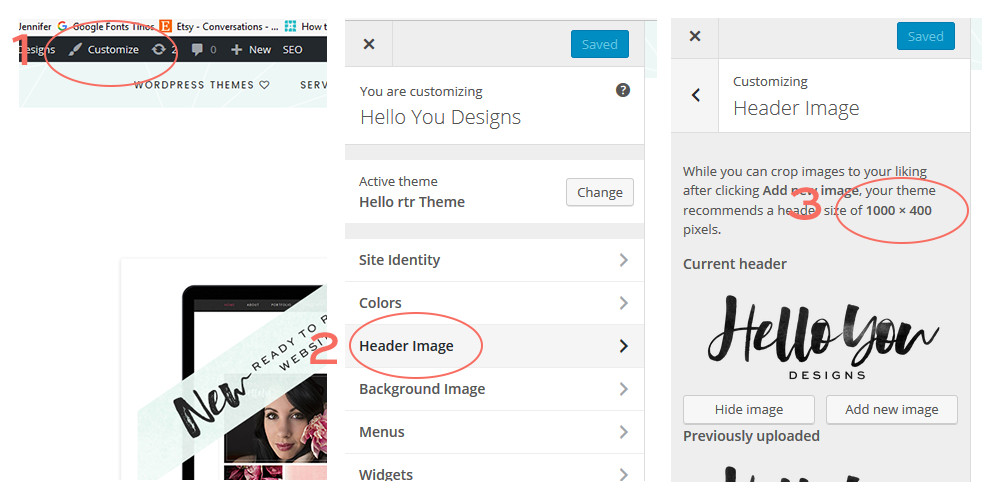
STEP 1: Log in to your WordPress dashboard and view the homepage of the site. In the top left corner is the Customize option. Click that.

STEP 2: Select “Header Image” from the menu.

STEP 3: At the end of the description will be what we will call the “canvas size”. For this tutorial I’ll be using the Hello Darling size of 1000×400.
logo header size how to

Create the Canvas

Open a new tab or window and go to PicMonkey.com

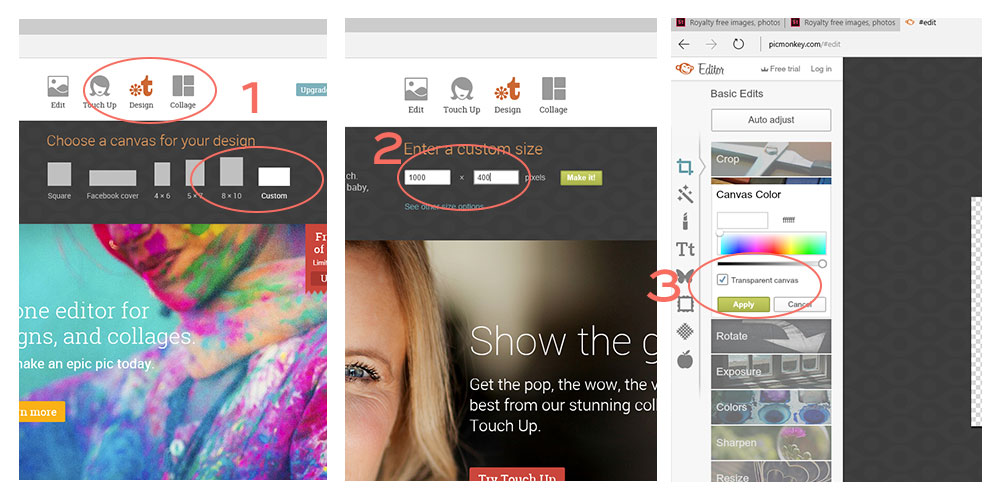
STEP 1: Hover over “Design” and select “Custom”

STEP 2: Enter in your logo/header size from your theme. We are using 1000×400 for the Hello Darling Theme. Then click “Make It”.

STEP 3: It is best to create a transparent logo/header. So over where it says “Color” check the box that says Transparent and hit “apply”.
logo-tutorial-canvas-size

Selecting the Logo/Header & Adjusting it

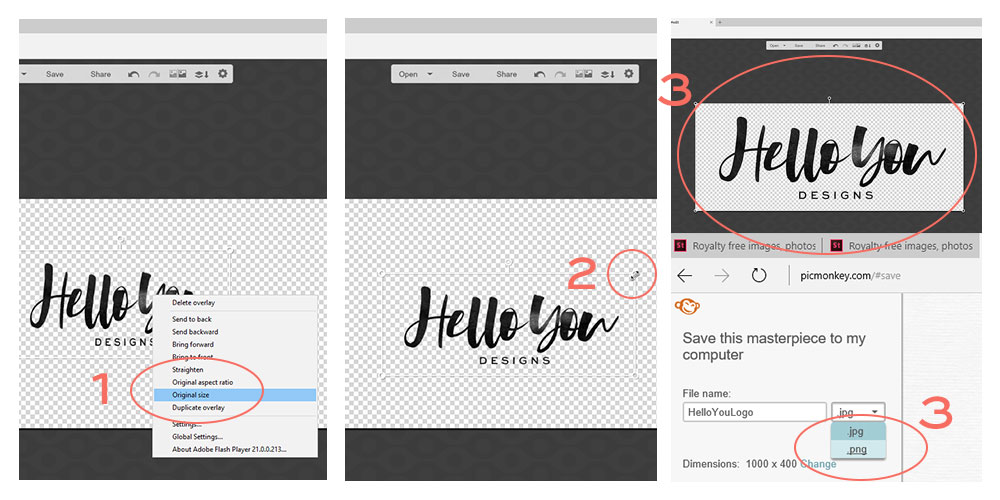
STEP 1: On the left hand side is the menu, select the “butterfly” icon. Then at the top of the new menu that comes up, choose “Your Own” and locate your logo file on the computer. It is best to use the .PNG format of your logo.

STEP 2: If your logo is huge it will be placed on the canvas and shrunk down in size. If you know your logo isn’t that much larger than the canvas, you can right click on the logo and select “Original Size” then adjust from there. If it is a huge file, doing that will make it super hard to adjust and it is better to stretch it into place.

STEP 3: Stretching it into place. Click on the logo and select the corner. Then pull it and adjust it until it sits perfectly on that canvas. Once done your logo is ready to be saved. Be sure to save it as a .PNG file.
logo-tutorial-size-and-save

Load Your New Logo/Header

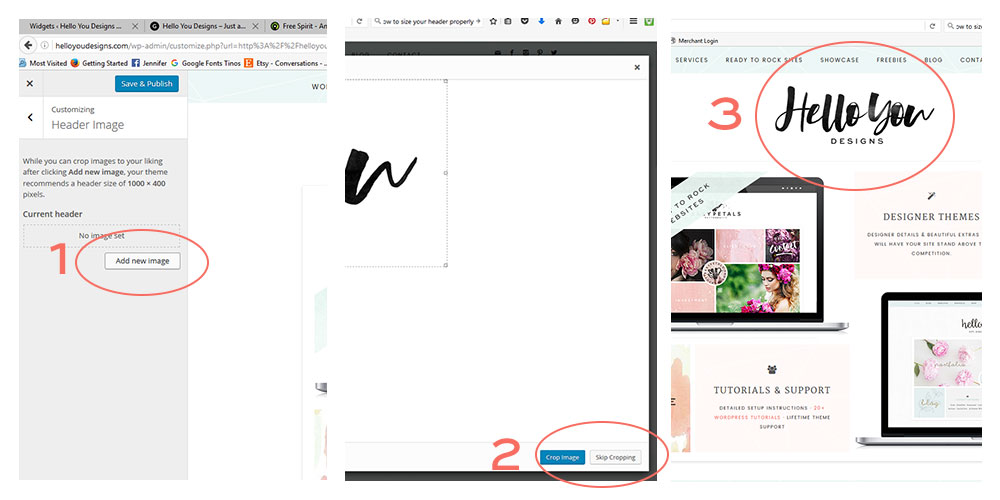
STEP 1: Follow the steps in the “Find Your Logo/Header Size” above and go back to the Customizer on your site. Once there select “add new image” and upload your new image. Then click “Select/Crop”

STEP 2: The canvas that your logo sits on is already the perfect size because we pre sized it. So no need to select “Crop Image”. Click on “Skip Cropping”.

STEP 3: A preview of how your new logo will look shows up. Hit Save and enjoy your properly sized logo/header on your gorgeous new site.
logo-tutorial-crop-and-save

Troubleshooting Tips

Logo is still fuzzy

You need to start with a logo that is larger than the canvas you are placing it on. If it is smaller you can still use it but do not stretch it to fit the canvas. Instead make sure it is full size and center it on the canvas. Also make sure you are always working with a PNG file. JPG files distort easily and will not be as clear.

Logo looked great before saving and is fuzzy now?

Make sure that you saved the logo as a PNG file.

Logo is rectangle sized, not square

This isn’t really troubleshooting. Some logos no matter what you do, will not work for the theme you are using. This is something to take into consideration when picking out a theme. If your logo is a rectangle shape and you’re trying to fit it in a small square space, the logo will look shrunk and not in proportion to the theme. The only option is to do a logo variation, possibly a badge style logo, or break up the long wording and create more of a box logo than a rectangle.

Logo is tall and not rectangle in size

If your logo is more of a square or circle, you have two options. The first is similar to the above solution. Do a logo variation so you have a longer logo. The other option is adjusting the header to accommodate your logo height. This is a task that is beyond what this tutorial will go into but changing the height of a rectangular spot is usually a possibility. If you have a Hello You Designs Theme and this is your issue, contact me and I’ll adjust your theme to best fit your logo.

Why is my logo smaller than the size we created?

This is a good question and usually where most people get tripped up. All of our themes have retina optimized logo areas. Which basically means it takes the original size and compresses the logo in half. What that does is ensures your logo is crisp and clear on all devices, especially Apple products.


Have a tutorial you would like to request?
Or a topic you want addressed?

Then please contact me. Would love to hear your post suggestions

Get in Touch

Jennifer

Outdoor hobbyist, mountain biking nut, hostaholic, DIYer, web designer, SCI-Fi Nerd, mother to 5.

Facebook X Instagram Pinterest

Get Updates, New Releases, & Subscriber Specials

Thank you for subscribing!
Receive 10% off your first theme purchase.
  • Absolutely love this theme! Finally made my site feel more like "me"!

    Ashley Sides
  • I absolutely love my new hello you theme! These guys are wonderful to work with! They provided super easy step...

    Chelsey Horn
  • I just love my theme from Jennifer. Beyond the theme, the support was top notch. She absolutely went above and...

    becca mclelland
  • Thank you HYD for helping me to create such a beautiful website. I have had so many people comment on...

    Alyssa Knee
  • I wish I had found HYD sooner. It would have saved me 1000's of dollars and a whole lot of stress. I'm in love with my new site and...

    Maria Lee

Services...

  • WordPress Themes
  • Full Access
  • Blog Extras
  • Theme Install
  • HYD Fonts
  • WordPress Hosting

Links...

  • FAQ
  • Showcase
  • Setup & Support
  • Account Login
  • Affiliate Program

Theme favorites...

Aster
Iris
Blogger
Willow
Your website shouldn't feel stuck as your brand ev Your website shouldn't feel stuck as your brand evolves.

One of the biggest advantages of building with a flexible design system is knowing you can continue refining, expanding, and updating your website as your business grows.

Whether you're launching something new, refreshing your brand, adding a sales funnel, or redesigning key pages, having access to layouts and collections that work together makes the process so much easier.

That's exactly what Full Access was designed for — giving you a growing library of themes, funnels, reusable sections, and future releases that evolve alongside your business.

And with introductory pricing ending June 1st, now is the final opportunity to lock in lifetime access at the current rate.

#WebsiteDesign #WordPressTheme #WebDesign #SmallBusinessOwner #CreativeEntrepreneur #FemaleEntrepreneur #BrandDesign #WebsiteInspiration #OnlineBusiness #DigitalProducts #WordPressDesign #KadenceTheme #BusinessOwner #CreativeBusiness #WebsiteTemplates #FeminineBranding #BloggingBusiness #WebDesigner #BrandingInspiration #OnlineMarketing
One theme — completely different looks ✨ One of t One theme — completely different looks ✨

One of the things I love most about Aster is how easily it can adapt to different brands, aesthetics, and content styles while still feeling polished and cohesive.

With flexible layouts, reusable sections, and effortless customization, you can create a website that feels uniquely yours without starting from scratch.

Whether your style is minimal, warm, feminine, editorial, or modern, Aster was designed to grow with your brand beautifully.

#WordPressTheme #WebsiteDesign #FeminineBranding #WebDesign #WebsiteTemplates #BrandDesign #CreativeBusiness #FemaleEntrepreneur #WordPressDesign #WebsiteInspiration #SmallBusinessOwner #OnlineBusiness #CreativeEntrepreneur #DigitalProducts #ShowitAlternative #KadenceTheme #BlogDesign #BrandingInspiration #WebsiteCustomization #WebDesigner
A few days ago we launched the Aster Funnel Collec A few days ago we launched the Aster Funnel Collection ✨

Thoughtfully designed sales pages, landing pages, and reusable sections created to help you market your offers beautifully.

With flexible layouts, one-click sections, and effortless customization, creating a polished customer experience has never felt easier.

Designed to pair seamlessly with the Hello Aster Theme while remaining flexible enough to beautifully complement your existing website and brand style.

#ShowitWebsite #WordPressTheme #FeminineBranding #WebsiteDesign #SalesFunnelDesign #CreativeBusiness #OnlineBusinessOwner #WebDesigner #BrandDesign #FemaleEntrepreneur #WordPressDesign #WebsiteTemplates #DigitalProducts #SmallBusinessOwner #CreativeEntrepreneur #MarketingTemplates #BlogDesign #BusinessWebsite #WebsiteInspiration #LaunchYourBrand
Quick update on Full Collection Access 🤍 We’ve ad Quick update on Full Collection Access 🤍

We’ve added the Aster Theme Collection to the library, and tomorrow we’ll be releasing the Aster Funnel Collection — together adding 175+ new blocks across both releases.

We’re also rolling out starter templates for every theme based on your feedback, making setup even easier for client work, faster launches, and clean starting points.

The Full Collection continues to grow as a living system, with all future releases and updates automatically added to your account.

If you’ve been considering the Full Collection, the introductory lifetime pricing is available until June 1st — and will not be offered at this level again.

#WordPressDesign
#KadenceWP
#KadenceTheme
#WebDesigner
#WebsiteTemplates
#SalesPageDesign
#FunnelDesign
#WordPressThemes
#NoCodeWebsite
#ShowitAlternative
#CreativeBusiness
#WebsiteInspiration
#DigitalCreator
#BrandDesign
#FemaleEntrepreneur
#OnlineBusiness
#WebDesignInspiration
#KadenceBlocks
#HelloYouDesigns
#WordPressWebsite
Your website is often the first impression people Your website is often the first impression people have of your brand.

It should feel intentional.
Clean.
Elevated.
Easy to trust.

Aster was designed for creatives, business owners, and bloggers who want a website that feels modern and refined — without needing to code or hire a developer.

Because your online presence should reflect the quality of your work ✨

#WordPressTheme #KadenceWebsite #WebsiteDesign #ModernWebsite #CreativeEntrepreneur #BrandIdentity #WebsiteInspiration #MinimalDesign #ElegantBranding #SmallBusinessOwner #OnlineBusinessTips #WebDesignInspiration #FeminineBranding #WordPressTips #CreativeBusiness
Your website should feel like a brand — not a temp Your website should feel like a brand — not a template.

Introducing Aster ✨
A modern WordPress theme designed to help your website feel elevated, polished, and beautifully intentional.

#WordPressDesigner #ElementorPro #WordPressThemes #CreativeBusinessOwner #BrandStrategy #ModernBrand #WebsiteGoals #MinimalWebsite #ElegantWebsite #WebDesignerLife #OnlineBrand #WebsiteAesthetic
The Hello Boss update is complete. New Portfolio, The Hello Boss update is complete. New Portfolio, Optin Page and ability to use the block editor for the shop pages. We also did some updating to the existing blocks and styling. 

Your blocks will automatically be updated in the library, so there is no need to update the theme file, unless you want the added ability to use the block editor on your Woocommerce Product pages.
Chic was updated with a Portfolio, Optin Page and Chic was updated with a Portfolio, Optin Page and of course the block editor for the shop pages. We also did some updating to the existing blocks and styling. 
 
Your blocks will automatically be updated in the library, so there is no need to update the theme file, unless you want the added ability to use the block editor on your Woocommerce Product pages.

Be on the lookout for your theme to be updated very soon. Boss & CEO are next. 

You can find the latest theme files in your account area on the site. As always, be sure to save a backup before updating your theme to the latest version.

Copyright © 2026 · Hello You Designs

Scroll to top
  • Home
  • Themes
  • Full Collection Access
  • WordPress Hosting
  • Blog Extras
  • Work With Us
  • Block Collections
  • Funnel Collections
  • Fonts
  • Showcase
  • Contact
Browse Themes ⟶
Search